You don't just know when they work.
You know what work they have done.
Your technicians and workers clock in from the job site, the report is completed on location with priced materials, and the client signs directly on the screen. At month-end, the official working-time record is ready without anyone spending hours typing in the office.
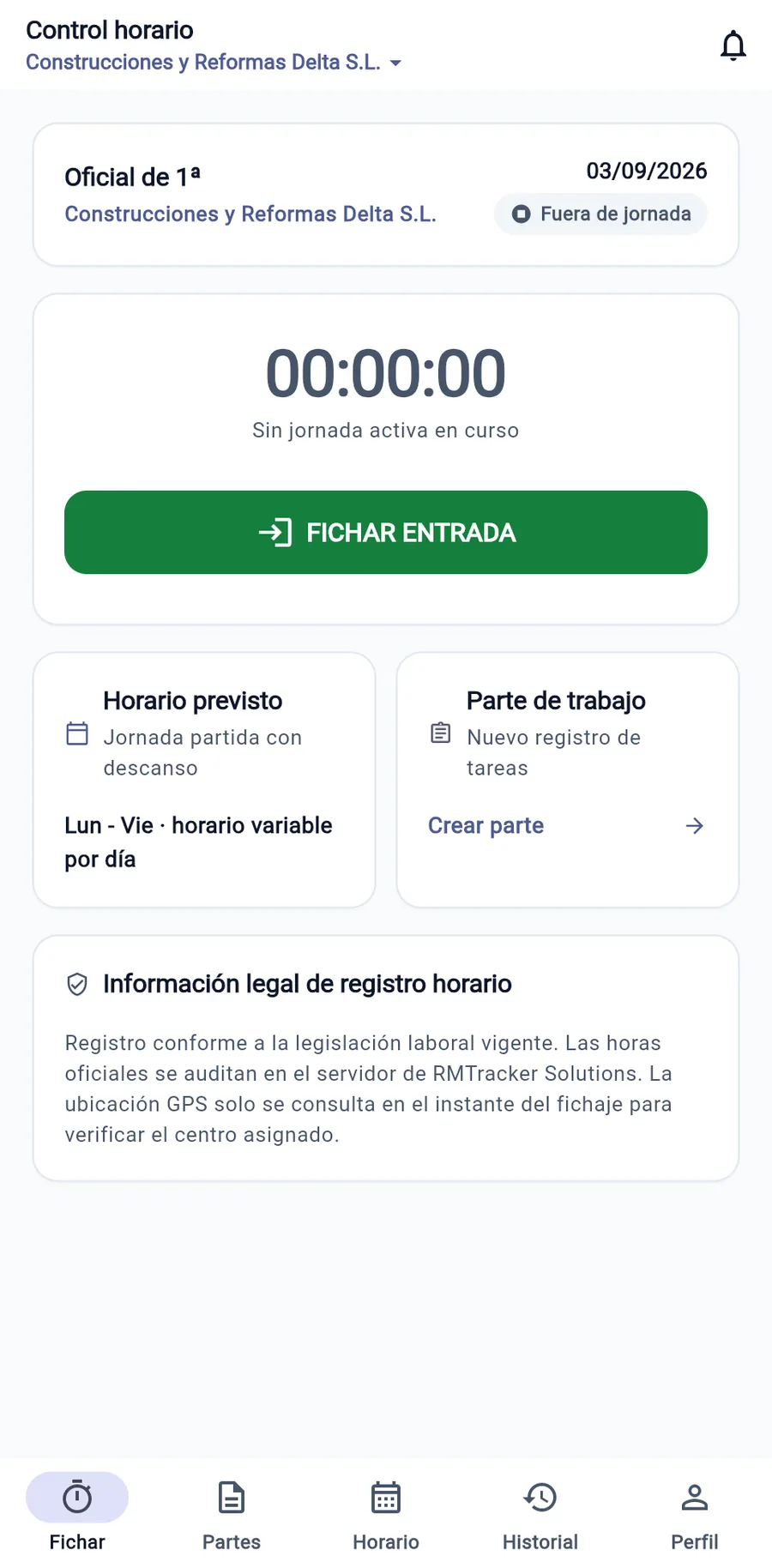
The month is reconstructed by hand
Your team's hours and the work they performed are part of the same workday, but currently travel separate paths and never meet until invoicing or an inspection arrives.
Hours recalled from memory
Hours are jotted down in stained notebooks or loose sheets of paper in the van. On the 30th, the office has to reconcile records from memory before sending payroll to the payroll agency (gestoría).
Reports typed twice
The technician drafts the delivery note by hand. Days later, administration must decipher the handwriting, re-type materials, and calculate costs, delaying billing for weeks.
Scattered photos and signatures
Installation photos remain lost in workers' personal WhatsApp chats and the client's signature is nowhere to be found when a future dispute arises.
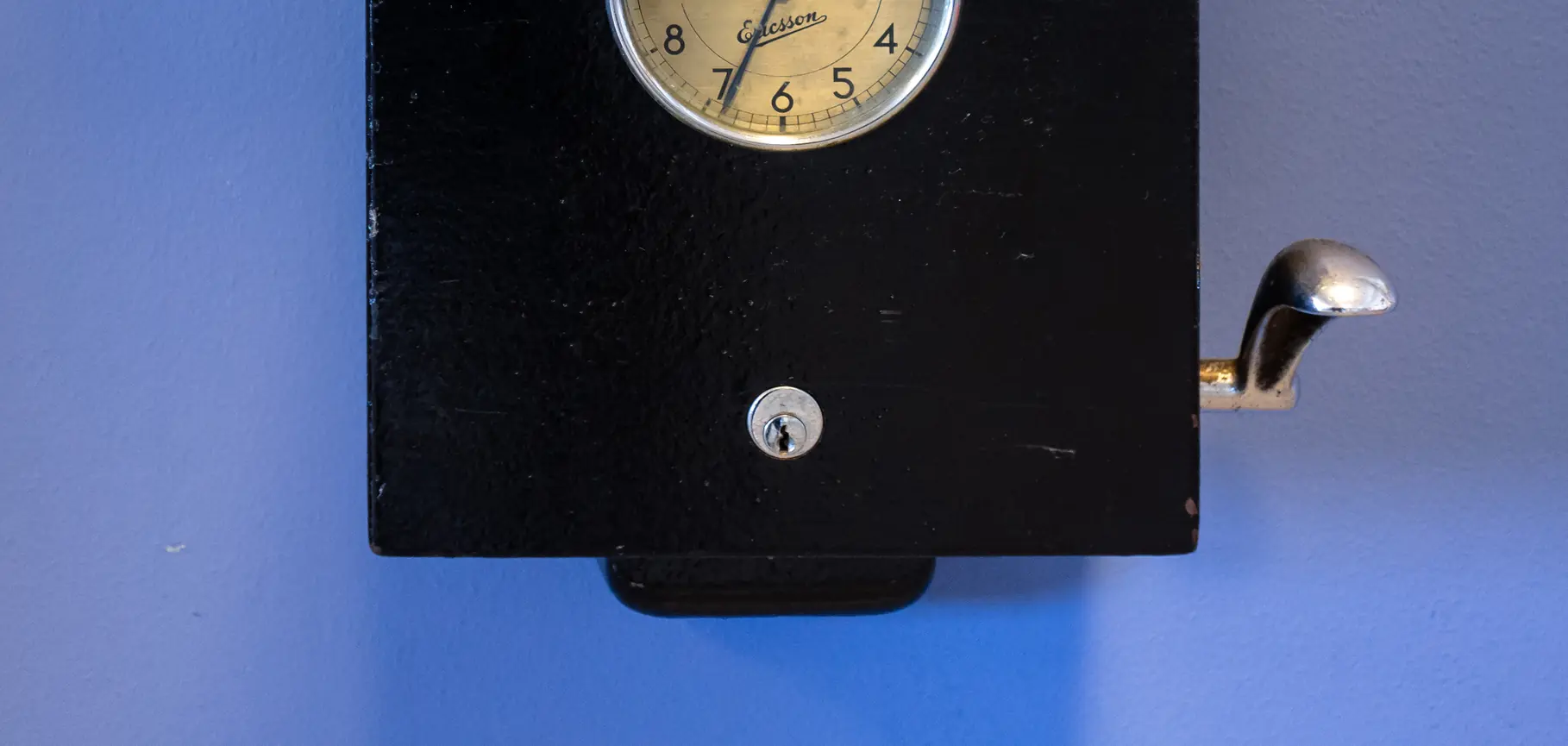
A complete workday, from start to finish
Five sequential timestamps, and none can be altered afterwards: every correction is recorded separately. That is how a simple clock-in becomes a traceable record.
Clock In
Clock in instantly from a smartphone, verifying that the worker is at the assigned site or client location.
Break
Start and end times with exact timestamps. The calculation automatically deducts breaks according to the collective agreement.
Work
The work report is drafted right on-site: tasks, priced materials, expenses, mileage, and photos.
Signature
The client confirms on screen with their finger, leaving their name and identity document number stamped on the report.
Clock Out
End-of-day clock out. If any discrepancy occurred, a justified incident is opened without altering real hours.
What your team sees, and what you see
Real screenshots of the live application. Designed to be fast on the worker's phone and powerful on the company desktop.
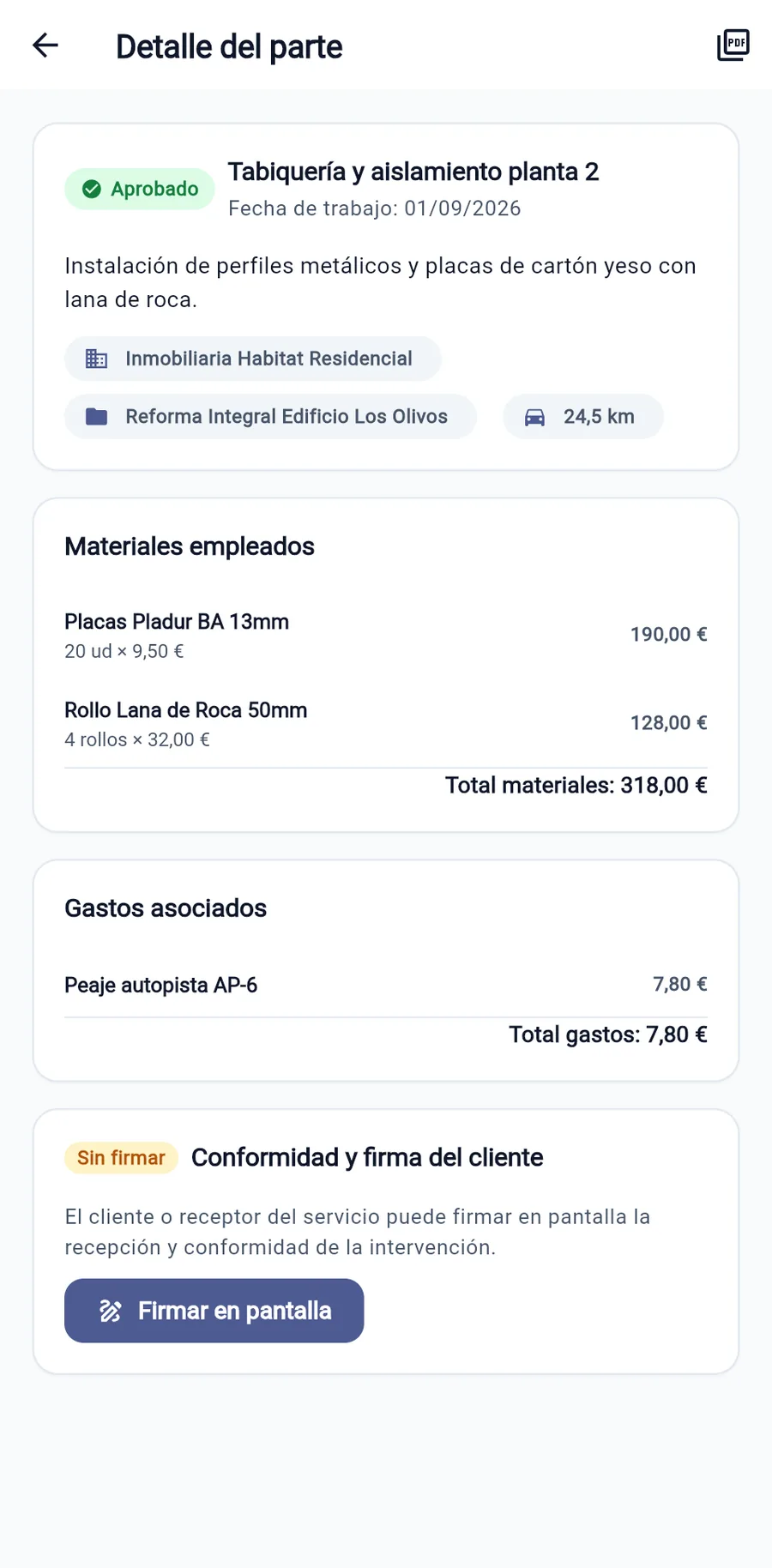
The report with itemized costs
Completed tasks, materials with unit prices, parking or per diem expenses, and mileage. Everything totaled for instant invoicing.
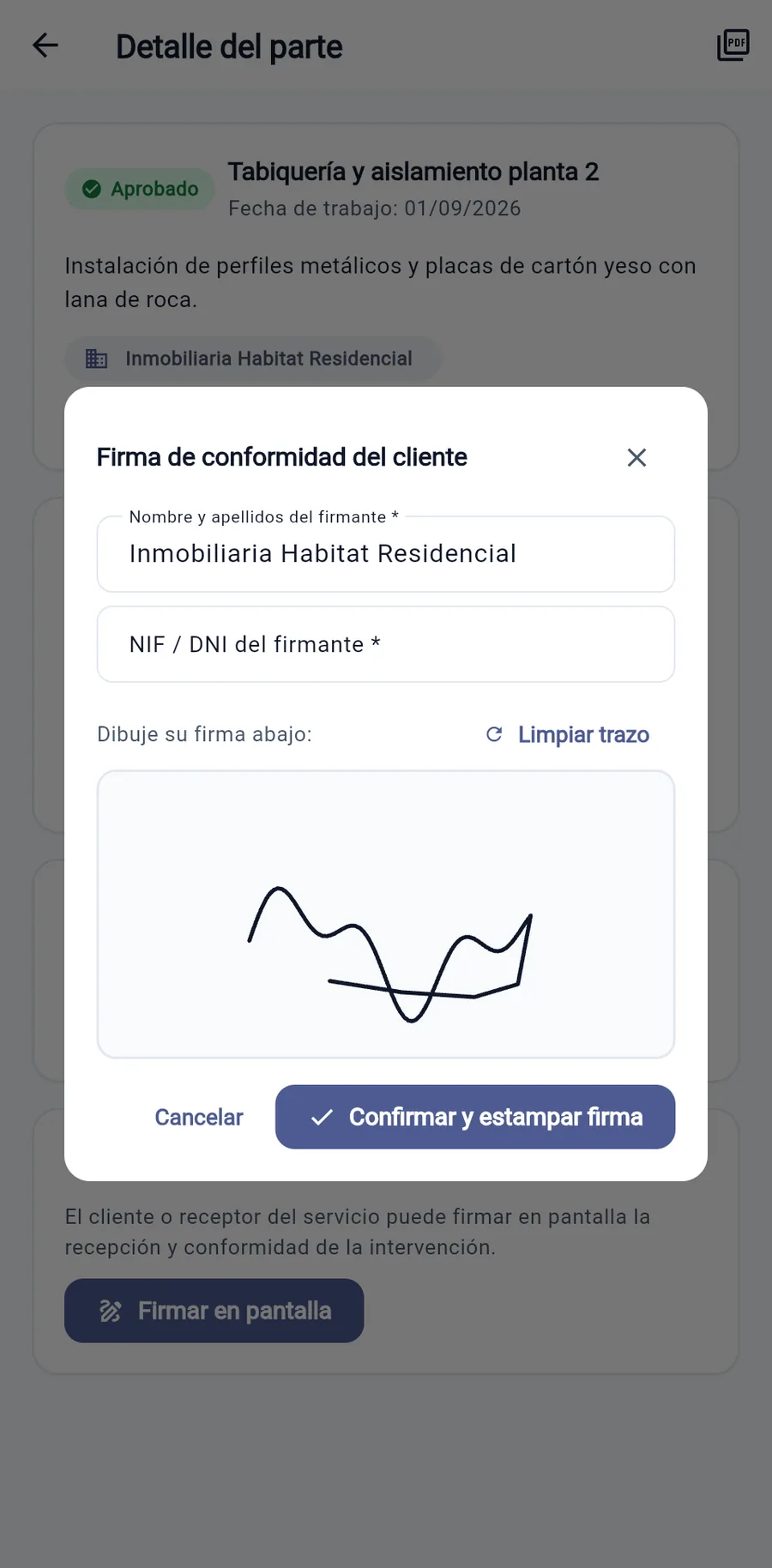
Customer signs on site
Name, identity document number and a fingertip signature directly on the mobile device before the technician or crew leaves the premises.
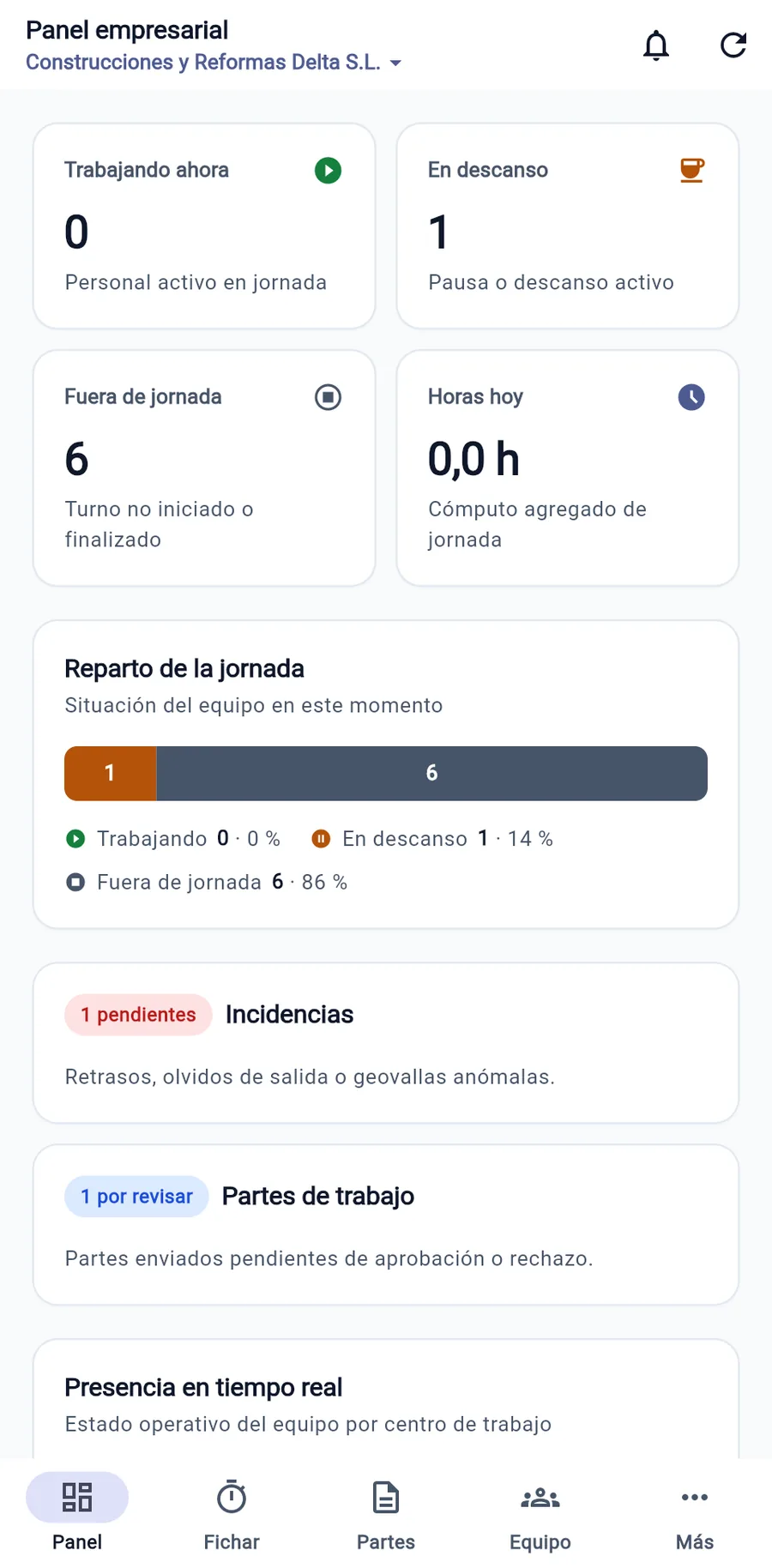
Who is working right now
Live view: staff on active shift, on break or off duty. Alerts for work reports pending approval and incidents to review.
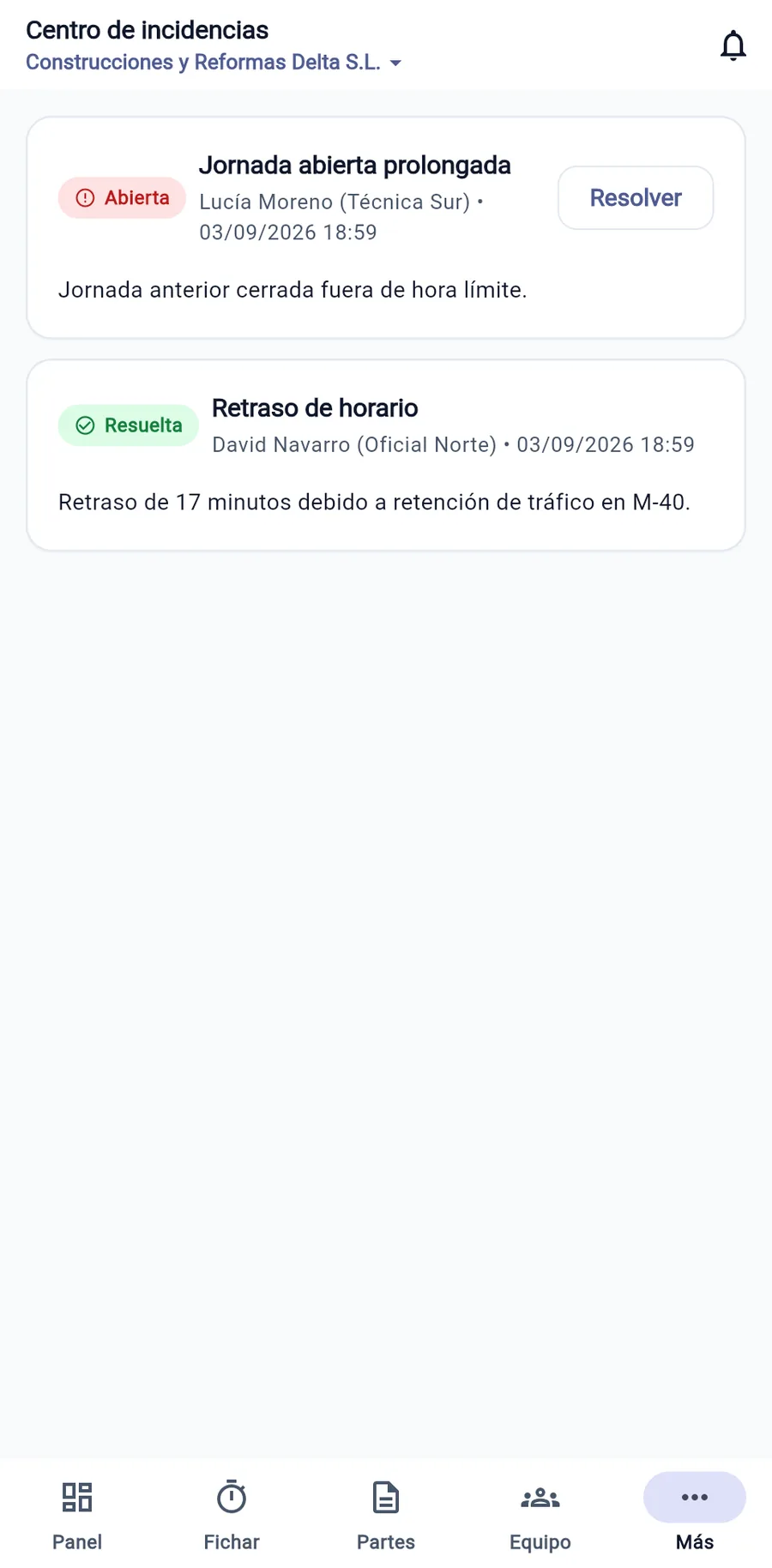
Missed clock-ins, with their reason
A shift left open accidentally or a justified delay is resolved through a request approved by a manager, with immutable audit logs.
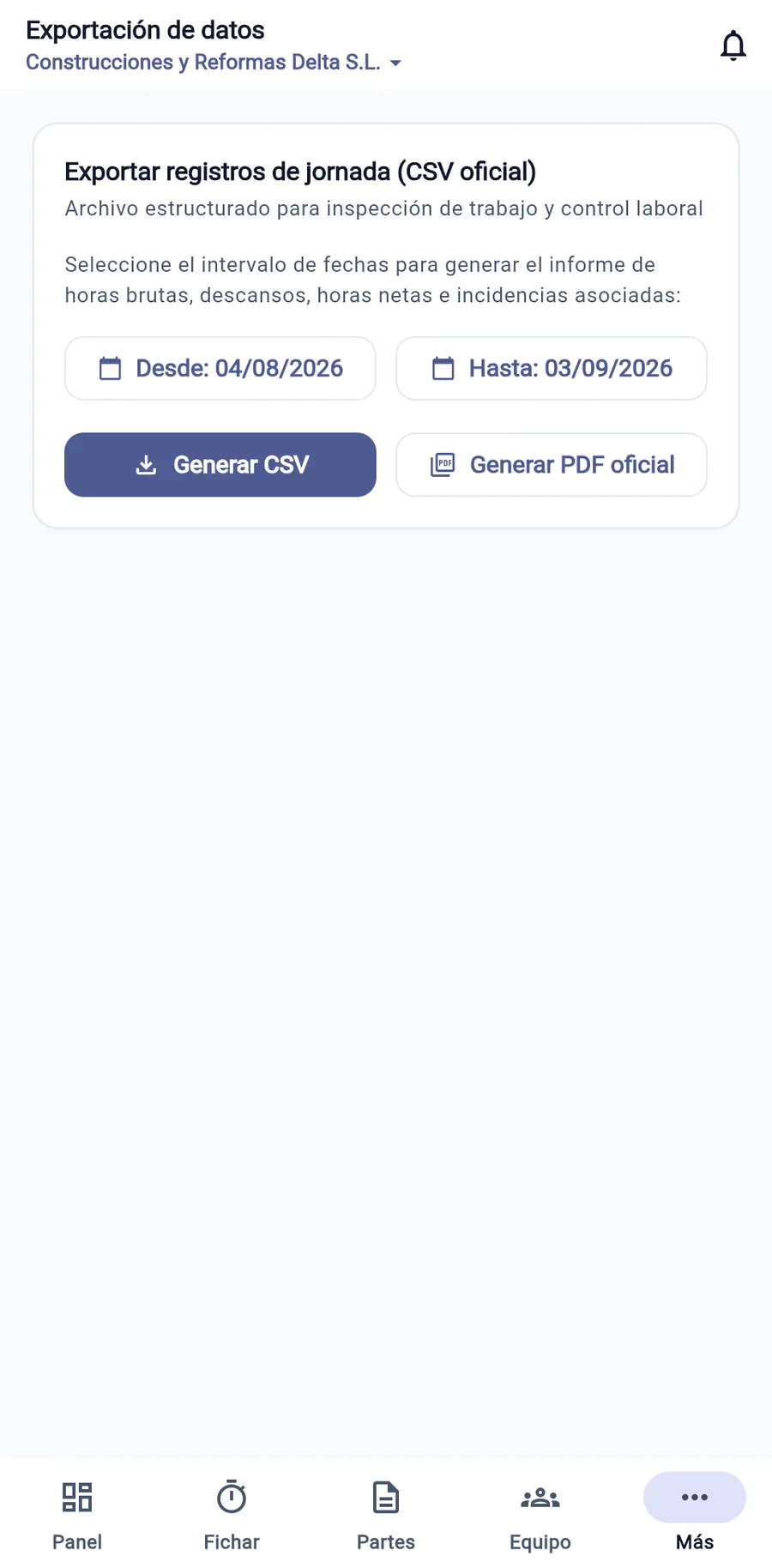
Month-end in official format
Select the period and download each employee's individual report in the format required by the labor authority, or as a CSV for your advisory firm or payroll.
Clock in within 2 seconds
A clear button to start work, pause for lunch, and log departure. Quick site verification without delaying staff.
The time tracking record required by regulations
Ley Federal del Trabajo (LFT) (Articles 58 to 68 of the Ley Federal del Trabajo (LFT)) requires all companies to keep a working-time record. This is what WorkLogTracker generates at month end, without manual transcription.
| Day | Clock In | Break | Clock Out | Regular | Overtime | Justified Incident |
|---|---|---|---|---|---|---|
| 01 | 08:02 | 13:00 – 14:00 | 17:03 | 8:01 | — | Verified point-in-time clock-in |
| 02 | 07:58 | 13:00 – 14:00 | 18:30 | 8:00 | 1:30 | Authorized extension for a technical service call-out |
| 03 | 08:15 | 13:00 – 14:00 | 17:00 | 7:45 | — | Justified delay due to traffic (Approved) |
| 04 | 08:00 | 13:00 – 14:00 | 17:00 | 8:00 | — | Full regular working day |
Representative 30-day sample with legal calculation of regular and overtime hours in compliance with Ley Federal del Trabajo (LFT).
Three steps and your team is up and running
No complex server installations, no biometric readers to buy, and no hardware maintenance fees.
Set up your company
Set up fixed work sites or projects, define shifts and working hours, and invite employees with their appropriate roles.
Your team installs the app
Each member logs in with their email and password to clock in directly, view their schedule, and fill out work reports.
You gain full operational control
Monitor who is on shift in real time, approve signed work reports for billing, and download the legal reports with one click.
What it does, and why it is built this way
Engineered specifically for genuine field work, with traceability and respect for privacy.
Clock-ins cannot be altered
Neither employee nor employer can rewrite past timestamps. Corrections require a justified request approved by a manager, leaving an indelible audit trail.
Works offline
In basements, tunnels, warehouses, or rural areas with no mobile signal, clocking in works exactly the same. The entry is securely stored on the phone and syncs without duplicates when the signal returns.
GPS check only when pressing the button
Location is only checked at the split second the worker taps to clock in, to verify it against the site. There is no continuous tracking, in line with privacy regulations.
Priced work reports
Materials with quantities and prices, mileage and daily expenses. The job sheet the client signs on the phone screen is the direct basis for issuing the invoice.
5 access roles
Owner, administrator, team supervisor, employee, and auditor. Each user accesses strictly what is relevant to their organizational role.
No fingerprint or biometric data
No fingerprint or facial recognition is used, protecting your company against penalties and legal risks arising from the processing of sensitive biometric data.
Designed for companies with mobile workforces
Specifically tailored for any SME or field crew delivering services outside a conventional office.
Construction & Renovation
Your crews clock in at the job site even without coverage. Daily reports with materials, machinery, progress photos and the developer's signature are ready instantly.
View solution for Construction & RenovationInstallers & Assembly
Your technicians carry out multiple jobs per day. With WorkLogTracker they clock in and out for their full working day and generate each installation report with materials and signature on site.
View solution for Installers & AssemblyMaintenance & Field Service
Eliminate the gap between your maintenance technicians' field visits and back-office management.
View solution for Maintenance & Field ServiceCleaning & Facility Services
Manage dozens of work locations and mobile teams with a tool built for working-time records that does not invade privacy.
View solution for Cleaning & Facility ServicesMobile Workshops & Roadside Assistance
For mechanics, mobile workshops and on-site assistance: track on-call hours, call-outs and service reports signed on the spot.
View solution for Mobile Workshops & Roadside AssistanceTransport & Logistics
Your drivers and couriers are constantly on the road. With WorkLogTracker they clock in at the start of their shift and log driving breaks and waiting times at loading docks, with delivery reports signed by the customer on the phone.
View solution for Transport & LogisticsTransparent pricing from day one
Pay only for active members on your payroll. No lock-in contracts or hidden fees.
Up to 10 employees · Prices per employee
Minimum of two billed seats per company. The owner is not billed; all other active roles count. The tier combines monthly and annual seats. For 11 to 100 employees, $50 MXN/month + VAT or $600 MXN/year including VAT applies to everyone. Over 100: negotiated contract.
| Number of employees | Monthly + IVA | Annual (VAT included) |
|---|---|---|
| Up to 10 employees | $55 MXN | $660 MXN |
| 11 to 100 employees | $50 MXN | $600 MXN |
Prices per employee. Over 100 employees: negotiated contract.
Contracting in Mexico is not yet enabled. Request information to prepare your registration.
- Full access to mobile (iOS & Android) and web apps
- Point-in-time geofence clock-in at the moment of tapping (no continuous tracking)
- Offline clock-in with automatic synchronization
- Work reports with tasks, priced materials, expenses, mileage, and photos
- On-screen customer signature with name and identity document number
- Monthly attendance report and CSV export
- Management of multiple work centers, shifts, and schedules
- Incident hub with immutable legal audit trail
- 5 access roles (owner, admin, supervisor, employee, auditor)
- Direct technical support and continuous updates
Estimate using the annual price including VAT, based on company size. No tax deductions are assumed.
Savings and Return on Investment (ROI) CalculatorHow much time and money does your company lose on paper-based work reports?
Estimate the value of time you could recover using your own assumptions.
Enter your monthly estimate per person. These are not measured results or guaranteed savings.
Annual value = employees × monthly hours saved × 12 × hourly cost. ROI = (annual value − annual fee) / annual fee × 100. Recovered time does not necessarily mean cash savings. Implementation and training costs are excluded.
Frequently Asked Questions about WorkLogTracker
Direct answers to questions business owners and team managers ask before getting started.
Does this work as attendance records for the STPS and in a labor lawsuit?
Yes, that is what it is designed for. It records each employee's daily working hours (clock-in, breaks and clock-out), the record cannot be modified or deleted afterwards, and it can be downloaded as a monthly report. This lets you keep and produce your attendance records (art. 804 of the LFT) and prove actual working hours when the burden of proof falls on you (art. 784 of the LFT). What no software can do for you is clock in: each employee has to do that.
Do you track where my team is at all times?
Absolutely not. There is no continuous tracking, background monitoring, or permanent tracking map. Geolocation is checked only at the split second when the employee taps to clock in or out, with the sole purpose of verifying whether they are within the radius of the assigned workplace. If location permission is not granted, the clock-in is still recorded, and this is noted.
What happens if an employee forgets to clock out?
The system prevents altering original timestamps retroactively. Instead, an incident is created: the employee submits a correction with a justified explanation, and a supervisor approves or denies it. This indelibly documents the logged time, requested adjustment, and authorizer: a history you can show during an inspection.
Does it work in basements, warehouses, or dead zones with no mobile reception?
Yes. WorkLogTracker stores clock-ins and work reports securely and encrypted on the device itself. As soon as the phone reconnects (Wi-Fi or mobile data), all records sync automatically with the server without ever being duplicated, even if the upload attempt is repeated.
Is the app only used on a mobile phone?
No. Workers and technicians usually use it on their mobile phone (iOS and Android) or browser to clock in and write reports with photos and signatures. Administrators, managers and auditors, for their part, have a web dashboard accessible from any computer to supervise working hours live, approve reports, manage shifts and download the official monthly reports.
How do work reports and the customer's signature work?
Right at the job site, the technician records the tasks completed, materials with their cost, expenses and photos. Before leaving, the client reviews the summary on screen, enters their name and identity document number and signs with their finger. The work report is closed and ready for invoicing at the office, doing away with lost paper delivery notes and hours of manual transcription.
Who is responsible for processing my workforce's personal data?
Your company is the data controller (responsable) for its employees' personal data under the LFPDPPP, and RMTracker S.L. acts as processor (encargado): it only processes the data on your company's behalf and following its instructions. As RMTracker S.L. is a Spanish company, the GDPR also applies, and the corresponding data processing agreement is signed when you subscribe. Your company's data is isolated from every other company's through row-level security, on servers hosted in the European Union.
Is there a minimum contract commitment or cancellation fee?
None. There is no lock-in, setup fee, or cancellation penalty. You can cancel at any time from your admin panel and have 30 days to export all your records and work reports.
Unify time tracking with your team's work reports
14-day full free trial, no credit card required and initial guidance included. See how much paperwork time you save from week one.
Does your company already use WorkLogTracker? Get the app: