
Working-Time Record Software
Mandatory, digital and traceable
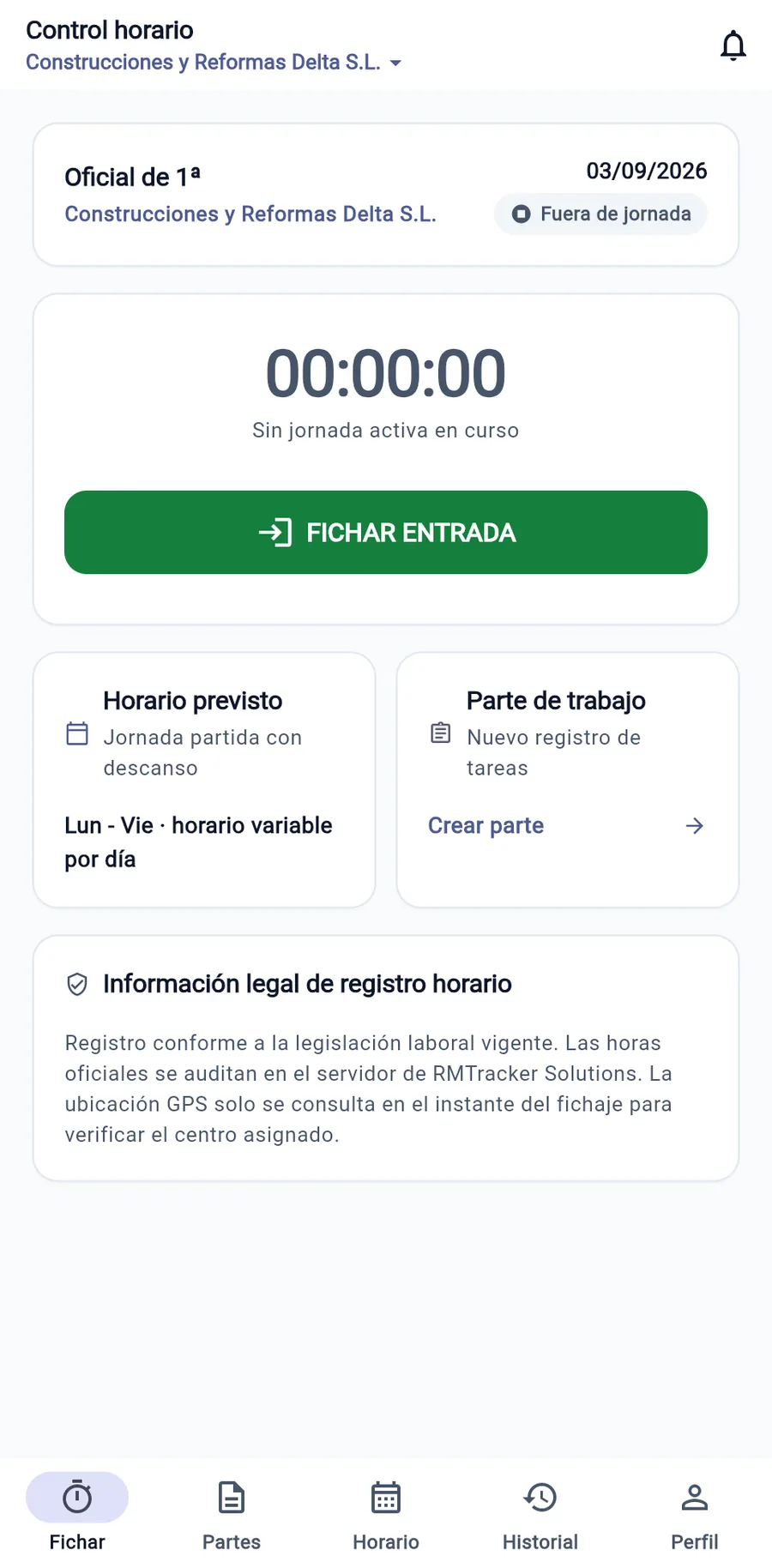
Designed to make it easier to meet the working-time record requirement of Royal Decree-law 8/2019 (Art. 34.9 of the Workers' Statute) and to answer requests from the Labour and Social Security Inspectorate (ITSS). Secure clock-in for crews and mobile staff without biometric fingerprints, offline mode and the official monthly template as a PDF in one click.
What the Working-Time Record Law Requires in Spain
Since the entry into force of Real Decreto-ley 8/2019, the daily working-time record is no longer optional. The law imposes very specific obligations that every company must meet to avoid severe financial penalties.
Daily log with exact start and end times
The exact moment each shift begins and ends must be recorded, along with all intermediate breaks and rest periods.
Guaranteed immutability and tamper resistance
Recorded data cannot be altered unilaterally after the fact by either the company or the worker without leaving an audit trail.
Mandatory 4-year retention at the workplace
Logs must be preserved and immediately available to the Labor Inspectorate, workers, and their legal representatives.
Immediate remote availability
In the event of an on-site or remote inspection, the company must be able to display and export records immediately without unjustified delay.
Zero sensitive biometric data
Explicit prohibition of fingerprint turnstiles or facial recognition for workplace time tracking, at the risk of multimillion-euro GDPR fines.
Statutory computation of regular and overtime hours
Clear monthly breakdown between the working hours agreed in the contract or collective agreement and any excess overtime hours.
Regulatory update: the planned digital record rules
The Government is processing a royal decree under which the working-time record would have to be digital, unalterable and remotely accessible to the Labour Inspectorate. It is not yet in force: today art. 34.9 ET does not require a specific format, but the Court of Justice of the EU requires the record to be objective, reliable and accessible. WorkLogTracker already records digitally and keeps the history of every change.
Paper, Excel, Fingerprints, or WorkLogTracker: What is Legal?
Many traditional methods expose your business to severe penalties from both the Labor Inspectorate and the Agencia Española de Protección de Datos (AEPD).
| Criterion | Paper Sheet | Excel Spreadsheet | Fingerprint Scanner | WorkLogTracker |
|---|---|---|---|---|
| Evidential value before the ITSS | ✘ Frequently rejected (suspicion of identical retroactive end-of-month signatures) | ⚠ Low (editable after the fact, no trail of changes) | ✘ Valid under labor law but carrying a very serious risk of AEPD penalties | ✔ Unalterable: timestamped, with a history of every change |
| GDPR Compliance and AEPD Criteria | ✘ High risk: paper sheets showing national IDs and signatures visible to third parties | ⚠ Medium risk: shared files without granular access control | ✘ Very serious infraction: multimillion-euro AEPD fines for fingerprint/facial recognition | ✔ No biometrics and one-off geolocation, no continuous tracking |
| Efficiency for work crews and field staff | ✘ Impractical: crumpled or lost paper sheets in work vehicles | ⚠ Unmanageable on mobile devices out in the field | ✘ Useless outside fixed office premises (requires hardwired readers) | ✔ Native mobile app in the pocket of every technician and worker |
| Operational in areas without cellular coverage | ✘ Works, but notebooks are constantly getting lost | ⚠ Fails when requiring a cloud or server connection | ✘ Fails if dependent on an in-office local network connection | ✔ 100% Offline Mode: stores locally and syncs automatically without duplicates |
| Generation of the Official Template in PDF | ✘ Endless office hours manually totaling minutes with a calculator | ⚠ Complex formulas prone to computation and rounding errors | ✘ Raw export requiring extensive secondary processing | ✔ 1-click download of the official monthly template, ready for signature and filing |
| Integration with Work Reports and service jobs | ✘ Separate delivery notes travelling through different channels | ⚠ Disconnected from customer work orders and delivery notes | ✘ Completely decoupled from actual field operations and billable work | ✔ Clock-in and priced work report with signature in the same app |
| Financial and implementation cost | ✘ Seemingly free but with enormous hidden costs in administrative labor | ⚠ Costly in supervisory time and high penalty risk | ✘ 500 € to 3,000 € in biometric readers plus recurring maintenance fees | ✔ Up to 10 employees: €2/month + VAT; minimum invoice of €4.99 + VAT. For 11–100: €1.90/month + VAT for everyone. Over 100: by agreement. |
Why you must not use fingerprints or facial recognition
In its official guidance, the Agencia Española de Protección de Datos (AEPD) prohibits the use of biometric data (fingerprints, iris scanning or facial recognition) for routine time tracking in companies. The AEPD considers that less intrusive and more proportionate methods exist.
Installing or maintaining biometric turnstiles at your facilities can result in penalties ranging from 20,000 € up to 360,000 € for breaching Article 9 of the General Data Protection Regulation (GDPR).
WorkLogTracker's biometric-free alternative
WorkLogTracker does without any biometric data. Workers clock in from their phone or browser with individual credentials and a one-off geofence check at the workplace: a record you can present to the ITSS without biometric data, as the AEPD recommends.
Fines & Penalties for Failure to Track Work Hours in Spain
The Ley sobre Infracciones y Sanciones en el Orden Social (LISOS) expressly classifies the offenses relating to working-time records.
Serious Infraction (Art. 7.5 LISOS)
From 1,000 € to 10,000 €Failure to implement working-time recording, failure to make the records available at the time of the inspection, deliberate alteration of the data, or failure to provide the copy to legal representatives.
Presumption of Full-Time Employment (Art. 12.4 ET)
4-Year Retroactive ClaimFor part-time contracts, if the employer cannot prove daily time tracking, the law presumes the contract to be full-time, ordering retrospective payment of 4 years of Social Security contributions with a 20% surcharge.
Undeclared Overtime Hours (Art. 35 ET)
Fine + Back Social Security ContributionsHours worked beyond the regular working day that are not shown as compensated or paid as overtime lead to settlement assessments for unpaid Social Security contributions.
The Official Monthly Working-Time Record Template in PDF
This is the monthly report that WorkLogTracker automatically issues for each employee, perfectly structured for delivery to the Labor Inspectorate or your payroll advisory firm.
| Day | Clock In | Break | Clock Out | Regular | Overtime | Incident / Audit Trail |
|---|---|---|---|---|---|---|
| 01 | 08:00 | 13:00 – 14:00 | 17:00 | 8:00 | — | Clock-in verified by a point-in-time geofence check |
| 02 | 08:00 | 13:00 – 14:00 | 18:30 | 8:00 | 1:30 | Overtime authorized for urgent intervention |
| 03 | 08:10 | 13:00 – 14:00 | 17:00 | 7:50 | — | Traffic delay justified and approved |
| 04 | 08:00 | 13:00 – 14:00 | 17:00 | 8:00 | — | Regular shift at assigned facility |
Up and running in under 10 minutes
No hardware terminals to purchase, no complex server installations, and no lock-in.
Register sites and employees
You create your WorkLogTracker account, add your workplaces or construction sites, configure the agreed working hours and register your workers in minutes.
Team downloads the app
Each worker downloads the free mobile app on iOS or Android and logs in securely. They clock in with a single tap, with or without coverage.
Compliance reports & peace of mind
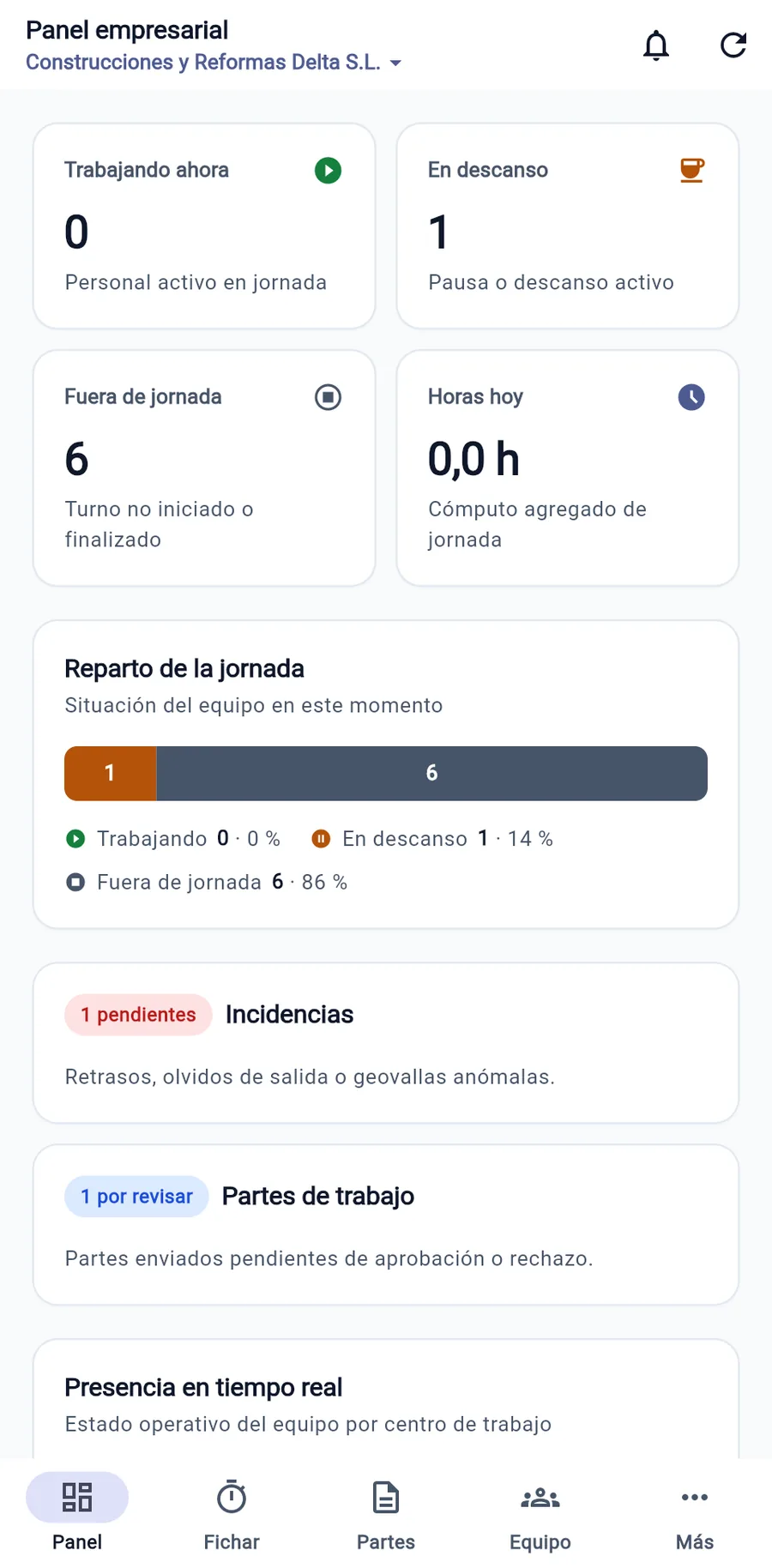
Administration supervises working hours in real time, resolves incidents with dual traceability and downloads the official monthly template whenever the authorities request it.
Tailored to field work outside traditional offices
Specially adapted for businesses with mobile technicians, worksite crews, and distributed personnel.
Construction & Renovation
Your crews clock in at the job site even without coverage. Daily reports with materials, machinery, progress photos and the developer's signature are ready instantly.
See compliance in Construction & RenovationInstallers & Assembly
Your technicians carry out multiple jobs per day. With WorkLogTracker they clock in and out for their full working day and generate each installation report with materials and signature on site.
See compliance in Installers & AssemblyMaintenance & Field Service
Eliminate the gap between your maintenance technicians' field visits and back-office management.
See compliance in Maintenance & Field ServiceCleaning & Facility Services
Manage dozens of work locations and mobile teams with a tool built for working-time records that does not invade privacy.
See compliance in Cleaning & Facility ServicesMobile Workshops & Roadside Assistance
For mechanics, mobile workshops and on-site assistance: track on-call hours, call-outs and service reports signed on the spot.
See compliance in Mobile Workshops & Roadside AssistanceTransport & Logistics
Your drivers and couriers are constantly on the road. With WorkLogTracker they clock in at the start of their shift and log driving breaks and waiting times at loading docks, with delivery reports signed by the customer on the phone.
See compliance in Transport & LogisticsFrequently Asked Questions (España)
Legally grounded answers for business owners, HR managers, and payroll specialists.
Which companies are legally required to track the working hours of their employees?
All companies and self-employed individuals with employees in Spain, regardless of size, revenue or industry, are required to do so under Article 34.9 of the Estatuto de los Trabajadores (as introduced by Real Decreto-ley 8/2019). The obligation covers the entire workforce, including full-time and part-time contracts, remote workers, itinerant staff, construction crews and field technicians. Only senior management staff in the strict sense are excluded.
Is paper-based time tracking or an Excel spreadsheet still legally valid?
In current inspection practice, paper sheets and Excel spreadsheets are the most heavily penalized methods. An Excel spreadsheet carries little evidentiary weight because any user can edit cells retrospectively without leaving an audit trail. Paper sheets, for their part, are often all signed at once at month-end with the same pen, which the ITSS regards as a clear sign of falsification. Furthermore, the planned royal decree on digital records, not yet in force, provides for the record to be digital, tamper-proof and remotely accessible to the Labor Inspectorate.
Why does the AEPD prohibit using fingerprints or facial recognition for clocking in?
The Agencia Española de Protección de Datos (AEPD), in its official Guide on biometric attendance control, has established that the use of fingerprint or facial recognition breaches the data minimization principle under the GDPR (Art. 9). Biometric data is a special category of data and employers must use less intrusive alternatives. Fines imposed by the AEPD on companies for using fingerprint readers already run into hundreds of thousands of euros. WorkLogTracker does not use any biometric data.
What does an ITSS labor inspector request during an inspection visit or formal request?
The inspector requests: 1) Daily clock-in, break, and clock-out logs of persons currently working at the facility; 2) 4-year historical records for all staff; 3) Accurate breakdown between regular and overtime hours; and 4) Verification that the system guarantees data immutability and delivery of monthly summaries to workers. With WorkLogTracker, supervisors generate the official PDF or CSV report instantaneously.
What are the ITSS fines and penalties for failing to comply with working-time recording?
Under the Ley sobre Infracciones y Sanciones en el Orden Social (LISOS, art. 7.5), failure to keep the working-time record or tampering with it is classified as a serious infraction, with fines from 1,000 € to 10,000 € per work center or company. Furthermore, in part-time contracts lacking reliable records, Art. 12.4 of the Estatuto de los Trabajadores presumes full-time employment, requiring payment of wage differences and Social Security contributions for the last 4 years plus a 20% surcharge.
How are hours tracked for construction crews, installers, and mobile field workers?
Via the WorkLogTracker mobile app for iOS and Android. Workers tap "Start Day" when they arrive at the site, warehouse or first service call. The app performs a point-in-time GPS geofence check to verify whether they are at the assigned location (without any continuous tracking afterwards). In a basement or rural area without coverage, the clock-in is stored encrypted on the phone and synced as soon as signal returns.
What happens if an employee forgets to clock out or makes a mistake in logging hours?
The system does not allow anyone to delete or overwrite the original record, fulfilling the legal requirement of immutability. Instead, the worker generates an incident request explaining the oversight. The supervisor reviews and approves or rejects the request. During an inspection, the log clearly demonstrates who requested the change, on what date, and who authorized it.
How long must time tracking records be preserved and how are they delivered to employees?
The law requires working-time records to be kept for a minimum of 4 years and to remain available to workers, their legal representatives and the Labor Inspectorate. WorkLogTracker stores data in the cloud with continuous backups and lets you download the official monthly template as an A4 PDF so that each employee receives their copy with the exact breakdown of hours.
Protect your business against Inspección de Trabajo y Seguridad Social (ITSS) fines starting today
Minimum monthly invoice of €4.99 + VAT per company, covering up to two employees. From three employees, €2 + VAT per employee per month up to 10. For 11–100: €1.90 + VAT per employee per month, for everyone. The minimum is not added to the per-employee total. Only the owner is not billed for a seat. Over 100: negotiated contract.